

Struggling to focus does not always mean you need a more complicated app. If your phone keeps interrupting, Forest or Freedom may help. If assignments pile up, Todoist or TickTick may be a better fit. If you just need a timer, start with Pomofocus. We compare six options by their actual jobs, free starting points and limitations, then share what we learned firsthand from four hours using Forest and Todoist.
The short answer
For phone distractions: Forest. For assignments and deadlines: Todoist. For a free browser timer: Pomofocus. For tasks and timing together: Focus To-Do or TickTick. For stronger cross-device blocking: Freedom. Start with the free option that fixes your actual problem instead of paying for the longest feature list. Our firsthand testing covers Forest and Todoist only; the other choices are feature-based recommendations.
Best focus apps for students: compare six useful options
Not every student needs another productivity subscription. First decide what interrupts your work: your phone, a missing plan, distracting websites, or simply getting started. These six tools do different jobs. RestMint has hands-on experience with Forest and Todoist; the other four entries are based on the providers’ published features, not tests we performed.
| App | Best for | Free starting point | Main limitation |
|---|---|---|---|
| Forest | Phone distractions and timed sessions | Core focus timer and Deep Focus features | Some allowlists and deeper analytics need Plus |
| Todoist | Assignments, deadlines and next actions | Beginner task planning | Not an app blocker; free project limits |
| Pomofocus | A simple browser-based study timer | Run a Pomodoro without installing software | Not a dedicated blocker or full assignment planner |
| Focus To-Do | Tasks and Pomodoro sessions in one place | Download and evaluate its task/timer basics | Check current free-versus-paid sync and reporting limits in your app |
| TickTick | All-in-one planning with a built-in focus timer | Task manager with a Pomodoro feature | More setup than a plain timer; advanced functions may require Premium |
| Freedom | Blocking distracting apps or websites on multiple devices | Start Now blocking sessions up to two hours | Scheduled/locked sessions and longer blocks require Premium |
How to read this comparison: “Free starting point” does not mean every listed feature is unlimited or available without an account. Features and local prices change. Check the linked official pages before upgrading. Product information was reviewed October 22, 2026.
Which should you choose?
- Always checking your phone? Start with Forest. If you need broader device and website blocking, compare Freedom or our study app-blocker guide.
- Missing deadlines or unsure where to start? Try Todoist. If you prefer a timer and a task list together, compare Focus To-Do and TickTick.
- Only want a 25-minute countdown? Open Pomofocus first; you might not need a subscription. Our Pomodoro app comparison covers five timer options and free-plan details.
A three-session test before paying
Pick an actual assignment, such as outlining one essay paragraph or completing five practice questions. Session 1: use your usual setup. Session 2: add a timer. Session 3: add the relevant blocker or task list. Keep the task difficulty as similar as possible; record setup time, unrelated app switches and completed work, not only minutes counted. This is a personal comparison, not a controlled experiment.
Want the detailed firsthand comparison? Below, we explain what happened during our four-hour Forest and Todoist study session, what each tool did well, and where the test cannot support stronger claims.
How we compared Forest and Todoist
We compared the companies’ published features, pricing, and privacy information with a four-hour hands-on study session using an iPhone, iPad Air, and desktop web setup. We prepared for exams in two subjects and planned assignment deadlines. In Forest, we used 25-minute and 50-minute focus blocks with Deep Focus enabled. In Todoist, we broke a 10-page research paper into subtasks, scheduled reading goals with Quick Add, and tracked completed work. We used Todoist Beginner and Pro, and a previously purchased, one-time Forest Pro license on iOS. Forest no longer sells that legacy Pro purchase to new users; its current options are Free and Plus. This was one user’s test, not a controlled study of improved grades or concentration.
| App | Best for | Free option | Paid-plan note |
|---|---|---|---|
| Forest | Starting focused sessions and reducing app switching | Core timer, Deep Focus app blocking, focus tracking, group rooms, and basic wellbeing tools | Forest Plus adds advanced analytics, custom allowlists, more Time Guard options, and other extras; local price varies by platform and region |
| Todoist | Organizing coursework, deadlines, and next actions | Beginner plan with up to 5 personal projects, reminders, list/board layouts, and limited filters | Todoist Pro is currently listed at US$7/month or US$60/year before local tax, with regional pricing possible |
What our four-hour study test showed
These observations come from EL ARROUMI AMINE’s reported four-hour session using an iPhone, iPad Air and desktop web setup. They describe how the tools felt in one study workflow.
| Observed in the session | What it means for choosing an app | Limitation |
|---|---|---|
| Forest’s growing tree and completed forest made 25- and 50-minute blocks visible and phone checks less tempting. | Forest may suit you if you already know your next task but need help staying with it. | We did not count avoided phone checks or measure a concentration improvement. |
| Deep Focus interrupted a reference lookup in an app that had not been allowed in advance. | Check access to your study references before starting a blocking session. | This session used a legacy Forest Pro license; it does not establish how every current Free or Plus configuration behaves. |
| Todoist Quick Add and subtasks broke a 10-page paper into clearer next actions; tasks synced between iPhone and desktop. | Todoist may suit you if unclear assignments and deadlines are your main obstacle. | Successful sync in this session does not establish long-term reliability or offline performance. |
| The five-project Beginner limit felt tight with a separate project for each class. Todoist did not block distracting apps. | Try your actual course structure before paying, and use a separate blocker if needed. | The limit’s effect depends on how you organize courses; this is not evidence that every student needs Pro. |
Our practical conclusion: Choose the tool by the obstacle: Todoist for deciding what to do next, Forest for protecting the time spent doing it. The session supports this workflow distinction; it does not prove better grades, faster assignment completion or a percentage increase in productivity.
Evidence limits: One user, one four-hour session, qualitative observations and no controlled comparison. Original session screenshots and numerical before-and-after results are not included. Reddit examples elsewhere in this guide are separate community reports.
Forest — best for starting a distraction-free study session
Forest turns a focus session into a growing virtual tree. Its current free tier includes the focus timer, Deep Focus app blocking, focus tracking, Plant Together group rooms, and a limited version of Time Guard. The core timer also works offline, which is useful if you deliberately disconnect while studying.
- Good fit: you keep opening distracting apps before you have finished a study block.
- Free-tier strength: the core anti-distraction experience does not require a subscription.
- Paid upgrade: Plus adds features such as custom app allowlists, more advanced focus analytics, multiple Time Guard apps/sites, and additional soundscapes.
- Watch out for: Forest helps you protect a session, but it does not organize a semester of coursework for you.
What we noticed in the test: The growing tree made an impulsive phone check feel costly, and the forest at the end of four hours made completed blocks visible. Forest did not organize assignments or tell us which subject to tackle next. Deep Focus also interrupted a quick phone-based reference lookup when the needed app was not allowed in advance. Forest also offers a separate real-tree planting option to eligible legacy Pro and Plus accounts using earned coins; the virtual trees grown during study blocks are not themselves real trees.
Check Forest’s current Free and Plus features
Todoist — best for turning coursework into clear next actions
Todoist is a task manager rather than a dedicated distraction blocker. Its free Beginner plan currently supports up to 5 personal projects, task reminders, flexible list and board layouts, limited filter views, and a week of activity history. For many students, that is enough to separate courses and keep the next assignment action visible.
- Good fit: you lose focus because you are unsure what to work on next.
- Free-tier strength: a small number of course projects can be managed without paying.
- Paid upgrade: Pro expands project and filter limits and adds features such as calendar layout, task duration, custom reminders, and full reporting history.
- Watch out for: Todoist can become another procrastination system if you spend more time organizing than doing the work.
What we noticed in the test: Quick Add let us enter a task such as “Submit draft to professor next Friday #English p1” without opening a date picker. Breaking the research paper into subtasks made the next action clearer, and tasks synced across the iPhone and desktop setup. The five-project Beginner limit felt restrictive when we used a separate project for each class. Todoist organized the work but did not block distracting apps during the session.
Check Todoist’s current plans · read Todoist’s privacy policy
Deciding whether Todoist’s free plan is enough? Read our Todoist Free vs Pro comparison for the project limits, reminders, calendar features, and upgrade decision.
Already plan assignments in Todoist and study on a Mac? Our Focusmo Free vs Pro study guide explains a possible timer workflow beside your task list, including completion-sync checks. Focusmo requires macOS 14 or later. The linked guide contains disclosed affiliate links; Focusmo was not part of our Forest and Todoist hands-on test.
Forest vs Todoist: which problem are you actually solving?
- Use Forest when the problem is opening Instagram, TikTok, YouTube, messages, or other distracting apps during a study block.
- Use Todoist when the problem is vague assignments, forgotten deadlines, or not knowing the next concrete action.
- Use both only if each has one clear job: Todoist chooses the task; Forest protects the study session.
If you need blocking controls across a phone, browser or desktop, read our best app blockers for studying comparison. It compares Freedom, Cold Turkey, LeechBlock and one sec by device support and ongoing free-plan limits.
How to use focus apps for studying
- Create one Todoist project for each active course, but keep the total system small.
- Turn assignments into concrete actions such as “outline section one” instead of “study chapter 4.”
- Choose one next action, then start a 25-minute Forest session.
- At the end of the session, record the next action before taking a break.
Check the app against one real assignment
Before paying, use one concrete task such as “draft the first 200 words of my essay.” Record the following across three study sessions. This is a suggested self-check, separate from our four-hour test.
| Record | Question to answer |
|---|---|
| Setup time | How long did you spend planning or configuring the app before starting work? |
| Task clarity | Could you name the next action without reorganizing your whole task list? |
| Distractions | How many times did you leave the task for an unrelated app or site? |
| Useful access | Could you still reach the references and tools needed for the assignment? |
| Finished work | What did you produce: words drafted, exercises completed or pages annotated? |
Keep the tool that addresses your recurring difficulty with the least setup. If blocking prevents necessary research, review the settings available in your plan or move the reference work to another device. A completed timer alone does not show that the assignment progressed.
Privacy and account considerations
Both products use accounts and process information needed to provide their services. Before storing coursework, personal notes, or other sensitive information in any productivity app, read the provider’s current privacy information and decide whether the data you plan to enter belongs there. For Forest, also consider whether you need account syncing at all if you mainly want the offline timer.
Frequently asked questions
Is Forest free for students?
Forest currently offers a free core experience with no time limit. Optional Plus features require a subscription, and the exact price depends on region and platform.
Is Todoist free enough for university or high-school work?
For a simple setup, it can be. The Beginner plan currently allows up to 5 personal projects, so a student with a small number of active courses may not need Pro. More complex systems can hit the free limits.
Can Forest and Todoist be used together?
Yes. Our preferred setup after testing both is to plan the next action in Todoist, then run a 25- or 50-minute Forest session to work on it. If choosing only one, start with Todoist for assignments and deadlines; add Forest if phone distractions are your main barrier. Avoid adding extra apps unless they solve a separate problem.
If you like timed study sessions, compare the best Pomodoro apps for students. For broader options, visit our Focus App Guides. If your biggest problem is the phone itself, see our practical guide to reducing phone distractions while studying.
Which app helps with distraction-free studying?
Of the two apps compared here, Forest is the closer fit when you want to resist switching to distracting phone apps during a study session. Todoist helps organize assignments and choose the next task. If you only need a timer, see our Pomodoro app comparison; if you need stronger phone controls, start with our iPhone and Android distraction guide.
Should students upgrade to Todoist Pro?
Try the free Beginner plan with your actual courses first. Upgrade when a specific limit or paid feature affects your workflow, rather than paying simply because you are a student. Our Todoist Free vs Pro comparison explains the plan limits and when the upgrade can be useful.
What Reddit users report
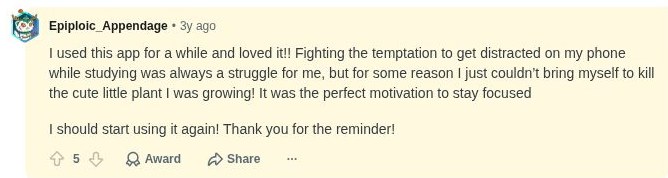
Community comments provide another perspective, separate from our four-hour test. In an r/GetStudying discussion about Forest, one user described how the prospect of losing a growing tree discouraged phone checks. In a Todoist student discussion, commenters described organizing tasks by subjects, assignments, and due dates. These are individual reports, not measured outcomes or current product promises.
Build a complete study routine: After choosing a focus app, visit our Study Focus Hub for practical Pomodoro sessions, distraction controls, study breaks, and ways to check what you remember.
Editorial note: This comparison combines one four-hour hands-on session with a review of the companies’ product information. The tested Forest Pro license was a legacy one-time purchase and is no longer sold to new users. RestMint has no commercial relationship with the products covered here. Features, prices, and policies can change, so verify current details before paying.